Case study:
Mobile App UX
A curated selection of key user flows from non-confidential Oscar mobile app screens, presented with clear explanations and context.
B2C - Oscar Car Rental App: In Q4 2025, 75% of B2C customers in the Oscar-US market preferred using a mobile app for car rentals.
B2B - Partner App: A mobile app used by car rental partners to manage fleet, bookings, and locations.
B2C - Oscar Car Rental App
- Flow 1
Search
In Search, smart “recommended” filters added specifically for the mobile app helped users find more relevant results more easily. We shaped this algorithm by observing user behavior and designing it to work closely with map-based interactions. In addition, mobile app users can also search for car rental locations directly through the map.
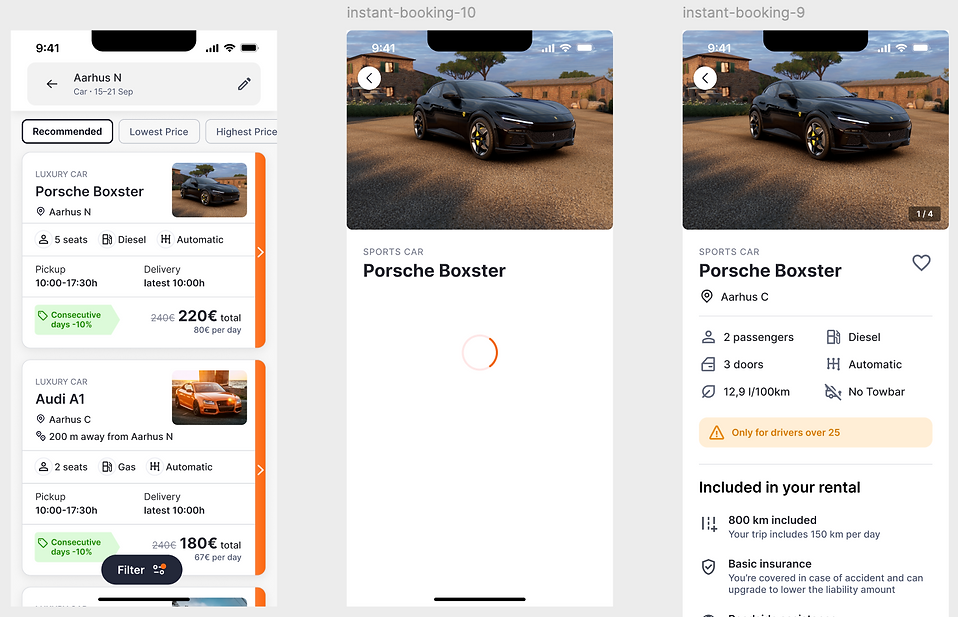


✓ Designed to surface the most relevant search results and enable users to start the booking process with a single tap.
✓ Advanced sorting and smart recommendations
✓ Map-based discovery for local availability
- Flow 2
Booking confirmation (Core business)
Transparency is the cornerstone of trust. The booking creation funnel screens breaks down every cost in a single view, including add-on services and insurance options, removing the anxiety usually associated with car rental
checkouts. Booking confirmation cover all core information customers need during rental process.
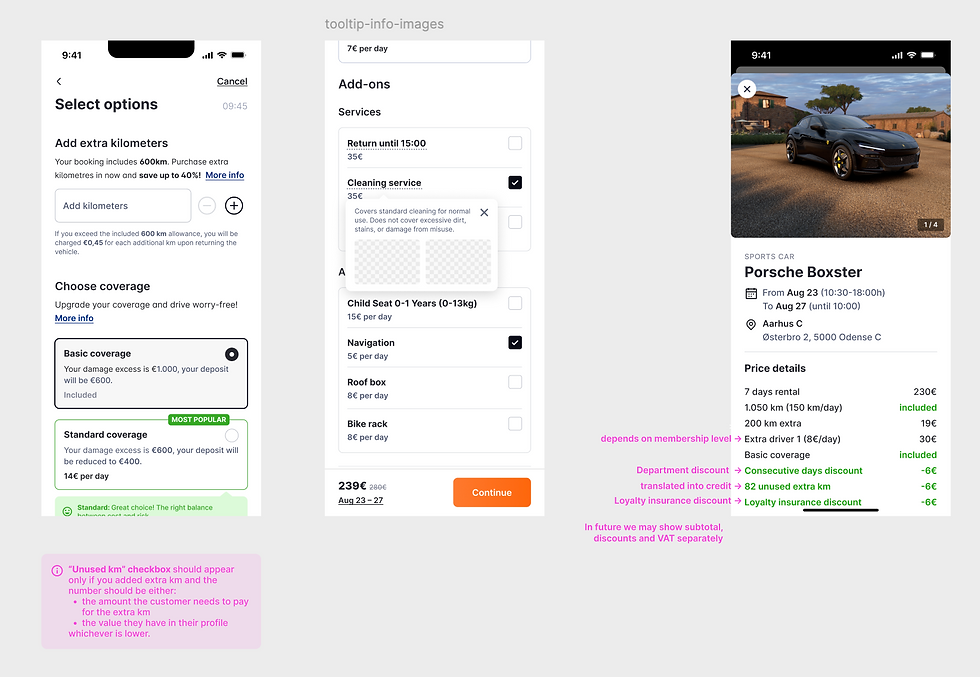

Across the entire booking funnel, the most clicked button by users was the “Price Details” button. Based on this insight, we made it sticky at the bottom of every step in the funnel and enriched it with booking- and pricing-related information. I also designed it with detailed annotations to support a smoother developer handoff.
✓ Real-time price updates on bottom sticky as users select loyalty discounts or insurance coverage.
✓ Focused on making the final price predictable and customizable from the very first step.
✓ One of the most common reasons customers contacted customer service was to ask about the rental location address. In the Spain market alone, this issue generated 200+ calls per month. Many customers requested that the location be shared with them via WhatsApp. To address this, we added a feature to the booking confirmation screen that allows users to open the location directly in their native maps app after completing a booking.
- Flow 3
Rental details
Once a booking is confirmed, the app pivots to utility. I optimized the post-booking experience to include one-tap navigation, easy vehicle identification, clear pickup instructions, and more.


Seamlessly bridges the gap between booking confirmation and real-world navigation by providing instant access to the provider’s address, opening hours, and easily shareable rental details.
✓ Once a booking is created, users can find all rental details in the Rentals section under upcoming bookings.
✓ Communication with customers is also managed directly in the app through notification toasts, ensuring timely and contextual updates throughout the experience.
- Flow 4
Loyalty program for app users
Club Oscar is designed to turn one-time renters into lifelong partners through a gamified progression system
and integrated account management.


✓ To bring more users into the app, we introduced guest booking, allowing customers to complete a booking without logging in.
✓ Bookings created as a guest can later be transferred to a user account after sign-up, creating a smooth path from low-friction conversion to long-term engagement.
✓ Gamified loyalty levels then help encourage repeat usage and long-term customer retention.
B2B - Partner App
- Flow 1
Booking Calendar
Managing high-volume fleet availability requires more than just a list. The calendar interface provides a bird's-eye
view of every vehicle, allowing partners to drag-and-drop bookings and instantly spot gaps in fleet utilization.

✓ The calendar view allows users to instantly differentiate rentals by booking type, dates, and vehicle making it easy to scan, organize, and plan ahead.
- Flow 2
Booking Agenda View
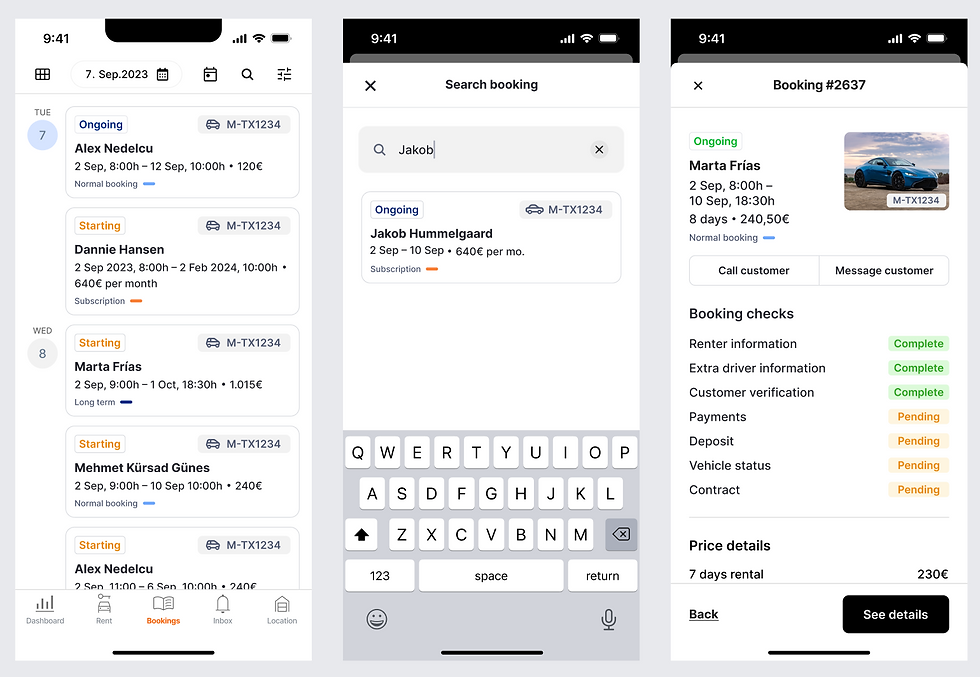
The booking agenda view that provides deeper booking details and allows users to compare multiple reservations side by side in a clear and structured format.
- Flow 3
Damage Reporting

At drop-off, location partners faced friction in the damage reporting process, from uploading photos to identifying the exact damage area and handling insurance communication. I designed an instant damage reporting feature that lets partners pinpoint the damaged part of the vehicle, attach photos, and submit the report automatically in a single streamlined process.